Dell Inspiron Mini 10 S541040IN8 laptop configuration and specifications
Dell Inspiron Mini 10 S541040IN8 laptop configuration and specificationsProcessor: Intel® Atom™ N450 with speed of 1.66GHz and l2cahe of 512KOperating System: Genuine Windows®RAM (Memory) 1GB DDR2 800MHz (1 x 1GB)Hard Disk: 250GB 5400RPM10.1" WidescreenVideo Card Integrated Intel® Graphics with wlanWireless Network Card: Dell WirelessBattery: 56WHr 6-Cell Lithium Ion Primary BatteryIntegrated
Cara Mensetting Default Browser
Internet Explorer
1. Klik pada Tools lalu Internet Options

2. Pada tab Programs di Default Web Browser klik button "Make Default"

3. Internet Explorer telah menjadi default browser

Mozilla Firefox
1. Klik Tools lalu Options

2. Pilih Advanced
3. Di tab General pada bagian System Defaults klik button "check now"

4. Muncul pop up windows klik Yes

Google Chrome
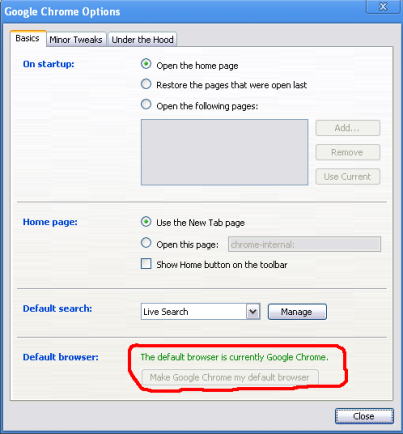
1. Pada icon setting klik menu Options

2. Pada tab Basics Klik button "Make Google Chrome my defaut browser"

Flock
1. Klik Tools lalu Options

2. Pilih Advanced
3. Di tab General pada bagian System Defaults klik button "check now"

4. Muncul pop up windows klik Yes

Perintah-perintah Run pada Windows XP

Accessibility Controls - access.cpl
Add Hardware Wizard - hdwwiz.cpl
Add/Remove Programs - appwiz.cpl
Administrative Tools - control admintools
Automatic Updates - wuaucpl.cpl
Bluetooth Transfer Wiz - fsquirt
Calculator - calc
Certificate Manager - certmgr.msc
Character Map - charmap
Check Disk Utility - chkdsk
Clipboard Viewer - clipbrd
Command Prompt - cmd
Component Services - dcomcnfg
Computer Management - compmgmt.msc
Date / Time Properties - timedate.cpl
DDE Shares - ddeshare
Device Manager - devmgmt.msc
Direct X Control Panel - directx.cpl
Direct X Troubleshooter - dxdiag
Disk Cleanup Utility - cleanmgr
Disk Defragment - dfrg.msc
Disk Management - diskmgmt.msc
Disk Partition Manager - diskpart
Display Properties - control desktop
Display Properties - desk.cpl
Display Properties - control color (w/Appearance Tab Preselected)
Dr. Watson - drwtsn32
Driver Verifier Utility - verifier
Event Viewer - eventvwr.msc
File Signature Verification Tool - sigverif
Findfast - findfast.cpl
Folders Properties - control folders
Fonts - control fonts
Fonts Folder - fonts
Free Cell Card Game - freecell
Game Controllers - joy.cpl
Group Policy Editor (XP Prof) - gpedit.msc
Hearts Card Game - mshearts
Iexpress Wizard - iexpress
Indexing Service - ciadv.msc
Internet Properties - inetcpl.cpl
Java Control Panel (If Installed) - jpicpl32.cpl
Java Control Panel (If Installed) - javaws
Keyboard Properties - control keyboard
Local Security Settings - secpol.msc
Local Users and Groups - lusrmgr.msc
Logs You Out Of Windows - logoff
Microsoft Chat - winchat
Minesweeper Game - winmine
Mouse Properties - control mouse
Mouse Properties - main.cpl
Network Connections - control netconnections
Network Connections - ncpa.cpl
Network Setup Wizard - netsetup.cpl
Notepad - notepad
Nview Desktop Manager - nvtuicpl.cpl
(If Installed)
Object Packager - packager
ODBC Data Source Admin - odbccp32.cpl
On Screen Keyboard - osk
Opens AC3 Filter (If Installed) - ac3filter.cpl
Password Properties - password.cpl
Performance Monitor - perfmon
Phone and Modem Options - telephon.cpl
Power Configuration - powercfg.cpl
Printers and Faxes - control printers
Printers Folder - printers
Private Character Editor - eudcedit
Quicktime (If Installed) - QuickTime.cpl
Regional Settings - intl.cpl
Registry Editor - regedit
Registry Editor - regedit32
Remote Desktop - mstsc
Removable Storage - ntmsmgr.msc
Removable Storage - ntmsoprq.msc
Operator Requests
Resultant Set of Policy (XP Prof) - rsop.msc
Scanners and Cameras - sticpl.cpl
Scheduled Tasks - control schedtasks
Security Center - wscui.cpl
Services - services.msc
Shared Folders - fsmgmt.msc
Shuts Down Windows - shutdown
Sounds and Audio - mmsys.cpl
Spider Solitare Card Game - spider
SQL Client Configuration - cliconfg
System Configuration Editor - sysedit
System Configuration Utility - msconfig
System Properties - sysdm.cpl
Task Manager - taskmgr
Telnet Client - telnet
User Account Management - nusrmgr.cpl
Utility Manager - utilman
Windows Firewall - firewall.cpl
Windows Magnifier - magnify
Windows Management Infrastr. - wmimgmt.msc
Windows System Security Tool - syskey
Windows Update Launches - wupdmgr
Windows XP Tour Wizard - tourstart
Wordpad - write
IP Configuration (Display Connection Configuration) ipconfig /all
IP Configuration (Display DNS Cache Contents) ipconfig /displaydns
IP Configuration (Delete DNS Cache Contents) ipconfig /flushdns
IP Configuration (Release All Connections) ipconfig /release
IP Configuration (Renew All Connections) ipconfig /renew
IP Configuration (Refreshes DHCP & Re-Registers DNS) ipconfig /registerdns
IP Configuration (Display DHCP Class ID) ipconfig /showclassid
IP Configuration (Modifies DHCP Class ID) ipconfig /setclassid
System File Checker Utility (Scan Immediately) sfc /scannow
System File Checker Utility (Scan Once At Next Boot) sfc /scanonce
System File Checker Utility (Scan On Every Boot) sfc /scanboot
System File Checker Utility (Return to Default Setting) sfc /revert
System File Checker Utility (Purge File Cache) sfc /purgecache
System File Checker Utility (Set Cache Size to size x) sfc /cachesize=x
Beda Laptop, Notebook dan Netbook


Notebook merupakan istilah awal yang muncul bersamaan dengan tibanya era komputer jinjing. Ukurannya lebih kecil dan lebih efektif untuk dibawa ke mana saja, jika dibandingkan dengan desktop PC atau komputer rumahan yang besarnya 'segede gaban'.
Istilah Laptop muncul seiring dengan adanya istilah Notebook. Namun kata 'laptop' lebih sering digunakan karena diambil dari perilaku pengguna notebook, yang lebih suka meletakkan notebooknya di atas paha (memangku) daripada meletakkan di atas meja. Kata 'Lap' sendiri merupakan bahasa Inggris yang artinya 'pangkuan'.

Netbook merupakan istilah baru yang diluncurkan Intel pada Februari 2008. Istilah ini ditujukan untuk kategori notebook berukuran kecil, ringan dan fungsionalitas yang mencukupi. Netbook bisa disebut sebagai versi laptop lebih kecil. Secara teknis, Netbook adalah istilah baru untuk laptop yang berukuran kecil dengan penekanan fungsi pada aplikasi internet dan wireless communication. Makanya, setiap netbook dipastikan wajib memiliki fasilitas wi-fi.

Ada juga istilah Nettop. Nettop adalah versi desktop (komputer meja) yang lebih mini. Di sini juga ada penekanan pada akses internet yang wajib ada. Netbook dan nettop merupakan proyek Intel untuk memberi akses komputer di negara berkembang.
Disadur dari okezone.com
Subscribe to:
Posts (Atom)